Electrical
Sprint 1:
We used 2 servo motors for the 2x2 pixel display which were connected to an Arduino. At this scale, the servo motors could be powered by the Arduino without drawing too much current, meaning we could rely solely on a laptop USB port as a 5V supply. To control the stepper motor, we used an A4988 stepper motor driver, which we supplied with 12V from a 50W power supply connected to a wall outlet.
Sprint 2:
We implemented a PCA 9685 board to test its functionality. The PCA board is a servo driver that can control up to 16 servo motors individually. We ended up controlling the servos directly from Arduino PWM pins for this sprint, but powered them with a 6V AA battery pack. To control the second stepper motor, another A4988 stepper motor driver was added and the step and direction pins were physically connected. This ensured that they could not become misaligned due to a code error. A limit switch was also added to the gantry in this sprint so the gantry could be reliably zeroed and commanded to the same place every time.
Sprint 3:
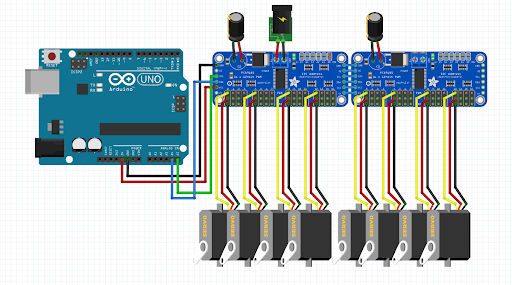
When scaling up to a 15x15 display, and adding a second vertical servo arm, the design change required 30 servo motors. To control more servos, we connected a secondary PCA board. When pivoting the design to make it work in accordance with time and downsizing the number of pixels, we eventually only needed one PCA board. In this sprint, we wanted to consolidate our power supplies, as having three separate sources of power wasn’t viable. We purchased a 5V 50W DC-DC converter that we could connect to our 12V power supply, which allowed us to get rid of the 6V AA battery pack and provided more current than we could ever need. We also added a shutter button for the Arduino so we could tell when the user wanted to interact with the mirror and a shutdown button so the Raspberry Pi could be cleanly power cycled.
Circuit diagram
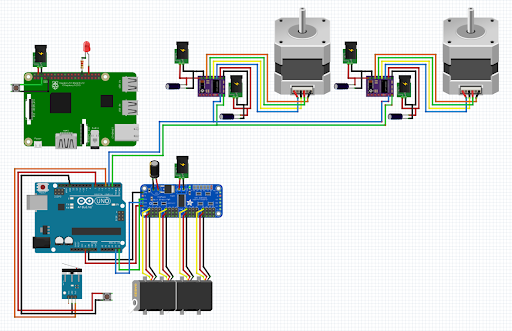
Planned servo circuit