Software Design

Our synthesizer program is a standalone C++17 binary that runs on a laptop. In our repo we refer to this program as the “visualizer” project. The visualizer is responsible for consuming the keyboard and Etch-a-Sketch events from the Arduino Uno serial and using them to drive the appropriate sound output which renders the Etch-a-Sketch drawing on the oscilloscope.
This page describes the current version of the software, which supports polyphony (the ability to play multiple notes at once). Since this version differs significantly from the original version, we have documented the original here:
 Software Design V1
Visualizer Program Dependencies
| Name | Version | Purpose | Link |
| cmake/make | cmake ≥3.9 | compiler toolchain | https://cmake.org/ |
| g++ | any supporting std=gnu++17 | compiler toolchain | https://gcc.gnu.org/ |
| portaudio | ≥ v19.7.0 | audio driver | https://github.com/PortAudio/portaudio |
| libserial | ≥ v1.0.0 | serial processing | https://github.com/crayzeewulf/libserial |
The visualizer program can be built from the following project folder: https://github.com/daniel-sudz/pie/blob/main/visualizer/src/bin/etch_a_sketch.cpp.
Visualizer Architecture: Data Structure
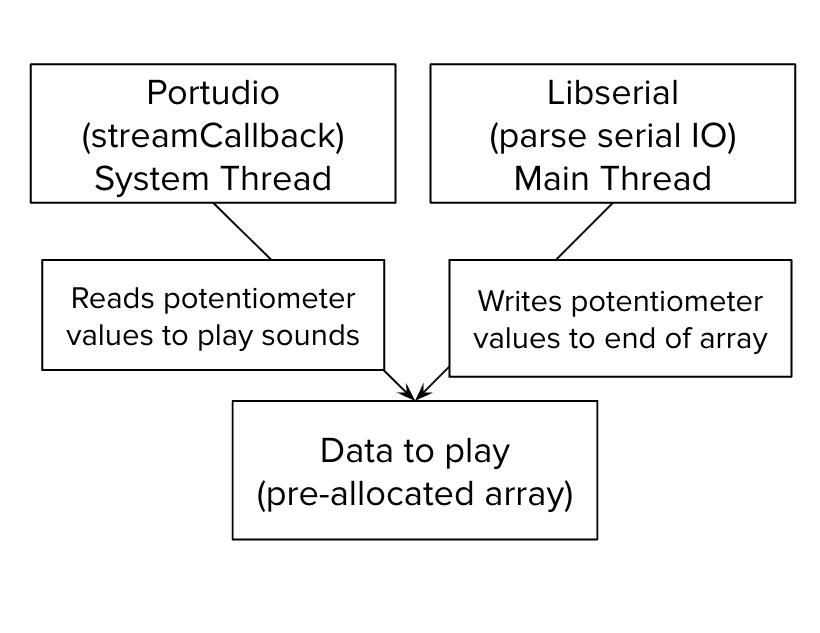
The portaudio library allows the user to output audio in a cross-platform and performant way using a callback design pattern. When the operating system requests more audio to play, the callback will be triggered, and the user is required to fill an audio buffer with sound that is about to be played.
Because of the way audio is implemented in most operating systems, the portaudio callback is handled on a separate thread compared to the main program thread. This raises the typical concerns of shared memory access that multithreaded programs bring. This issue is exacerbated by the fact that portaudio recommends not using multithreaded primitives such as locks or other unbounded system calls such as memory allocation due to concerns about performance and undefined behaviour (https://www.portaudio.com/docs/v19-doxydocs/writing_a_callback.html).
Through extensive testing and tuning, we have found that the software design in V1 to be unsuitable for polyphony support (playing multiple notes at once). In our previous design, we stored Etch-A-Sketch potentiometer values in a linked-list which worked great for playing one note. However, to play multiple notes, we need to support direct indexing into the potentiometer values because seeking forward or backwards on the linked-list posed a significant degradation in performance.
Given that we already have logic to not record potentiometer values when they are not being used by the user, we calculated that it would be possible (on a computer with a decent amount of RAM) to pre-allocate a 256MB continuous block of memory that would be sufficient for any reasonable user of the Etch-A-Sketch.
Note that on most C++ compilers, the default stack size is very small. To support such a large allocation of memory, we modified our g++ link flags to inject the following flag for the ld program (https://linux.die.net/man/1/ld).
set(CMAKE_EXE_LINKER_FLAGS "${CMAKE_EXE_LINKER_FLAGS} -Wl,-stack_size -Wl,0x20000000"This Cmake directive sets the stack_size parameter of ld to 0x20000000 which corresponds to 512MB.
Polyphony Calculations
We output audio to a DAC (in our case SCHIIT box 3) that supports a given frequency (in our case 192kHz). Let’s denote this frequency . In our code, we keep track of the current global time using current_buffered_trace_time. This variable represent the time, in seconds, assuming all currently buffered audio samples to the DAC have finished playing.
When the system requests audio through the streamCallback function we calculate the following for each key being pressed on the keyboard:
We calculate note_traces to be the number of times this note has “traced” the entire Etch-A-Sketch picture.
We calculate the current position (in range from 0-1) that the note represents in the Etch-A-Sketch picture by looking at the fractional part.
We convert from a saw-tooth wave-form to a triangle-wave form pattern to make the audio sounds more pleasant. Note in this case, you also need to pre-adjust the frequency by a factor of 2 to keep the pitch at the same frequency.
For polyphony support, we average all the individual note positions together. Then we calculate the the index of the potentiometer values to retrieve using:
Finally, we we retrieve the desired potentiometer values, normalize them it by the scale of the potentiometer, and output a left and right channel sound.
Note that after rendering every DAC sound sample, we also need to update current_buffered_trace_time with the elapsed time.
MacOS Audio Setup
To support both the Etch-A-Sketch rendering and the audio output at the same time, you should setup a combined audio device that will split the generated audio output between an external DAC (driving the physical oscilloscope) and a speaker.
The only requirement is that the physical DAC should support a two-channel output of 192kHz. Below are instructions on how to configure a combined audio device on Macos. See the official article https://support.apple.com/guide/audio-midi-setup/play-audio-through-multiple-devices-at-once-ams7c093f372/mac for more details.
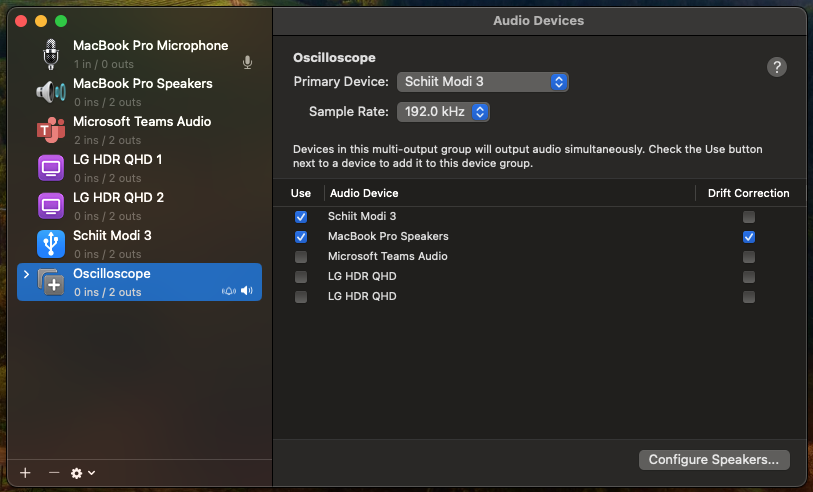
In the "Audio MIDI Setting" create a "Multi-Output Device" called "Oscilloscope" that combines your external DAC driving the physical osciliscope with you desired speaker's output. We have found that the built in speakers on the latest Macbook's sound quite pleasant and are more than good enough.
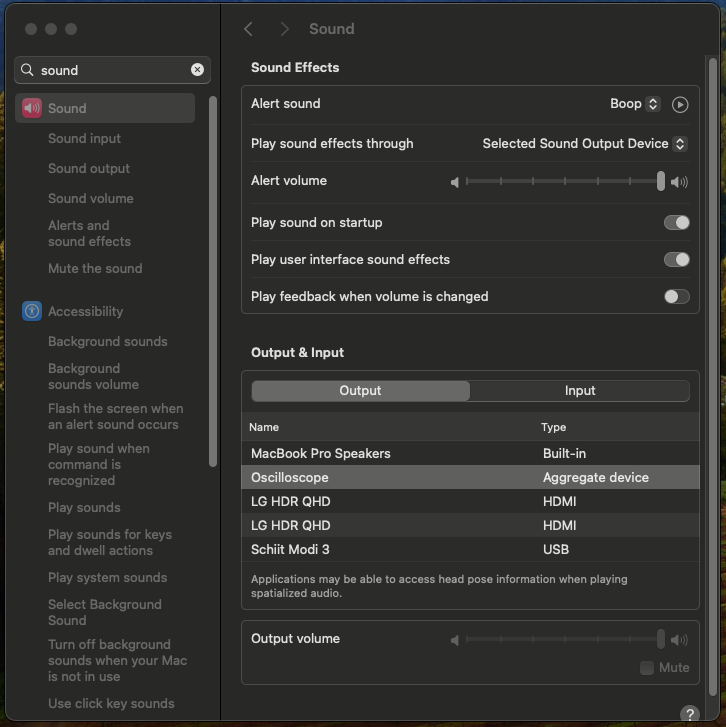
Select the "Oscilloscope" device that you created in the audio output.
Building the Visualizer
We feature build-scripts that test the Visualizer program across a wide variety of macos and ubuntu versions. If you want to compile and run the Visualizer program locally, you can take a look at the sample build scripts to install the dependencies for your platform: https://github.com/daniel-sudz/pie/blob/main/.github/workflows/build.yaml.
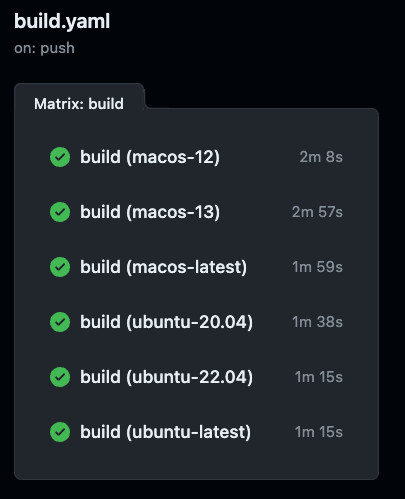
Compilation targets that we current support/test against for the Visualizer program. You can check the status of the latest build in https://github.com/daniel-sudz/pie/actions/workflows/build.yaml.
Running the Visualizer
After compiling the program, you can bootstrap the Visualizer program by running the “etch-sketch-loop” bash script. If you see the following output, you should be good to go:
danielsudz@Daniels-MacBook-Pro-5 visualizer % sudo ./etch-sketch-loop
[INFO]: Located arduino serial port at /dev/tty.usbmodem11401
[INFO SERIAL]: The serial port has opened succesfully
[INFO AUDIO]: started initializing portaudio
[INFO AUDIO]: finished initializing portaudio
[INFO AUDIO]: FOUND THE SCHIIT BOX
[INFO AUDIO]: Sample rate of 192000 is supported!!!
[INFO SERIAL]: Currently holding 1 pot value and playing freq 0 frequency