Our Process

We completed this project in three two-week long sprints. Here’s what we did in each one!


Sprint 1
Sprint 2
Sprint 3
Final Push
Sprint 1

Sprint 1 Deliverables:

Mechanical:

Software:

Electrical/Firmware:

Fig. Initial CAD

Mechanical Design:

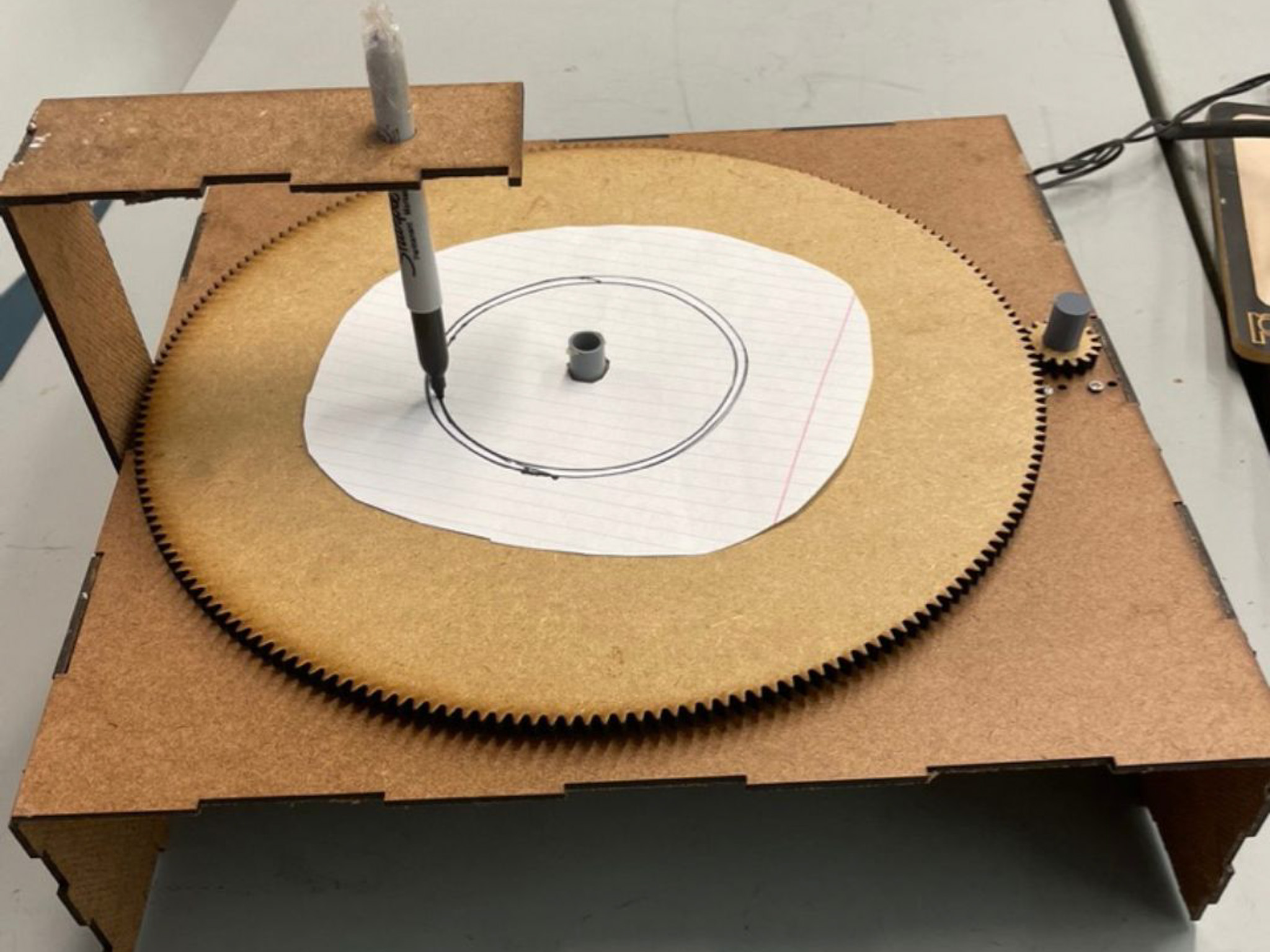
For our first sprint, our main objective was rotating the turntable. To do this, we laser cut a small gear to put on the motor shaft. We laser cut teeth onto the edges of the disk so it could mesh with the small gear, creating a 12:1 gear ratio. This large gear ratio along with a slow spinning DC motor allowed us to spin the disk sufficiently slowly that it would complete only one rotation over the length of one song.

Fig. Sprint 1 prototype


We created the structure for our first prototype out of ⅛” hardboard and added a structure to hold a pen.


Electrical/Firmware Design:

In terms of integrated electronics, the first sprint was pretty simple. I hooked up a spare DC motor to the prototype and ran it at different speeds with serial commands. In the background I was researching stepper motors and motor control for the next sprint.

Software Design:

Going into the first sprint, we had a lot of uncertainty about how difficult the kind of audio analysis we were trying to do would be. This sprint involved a lot of researching and trying out different audio processing libraries. The goal was to start by breaking the song up into different frequencies. The visuals below, called chromagraphs, were generated by using the library Librosa. At the end of the project, we only ended up using Librosa to load the song, which was not strictly necessary (we essentially didn't end up using any of Librosa's features).


Fig. chromagraphs

Sprint 2

Sprint 2 Goals:

Electrical/firmware:

Software:

Mechanical:

Fig. linear pen mechanism


Mechanical Design:

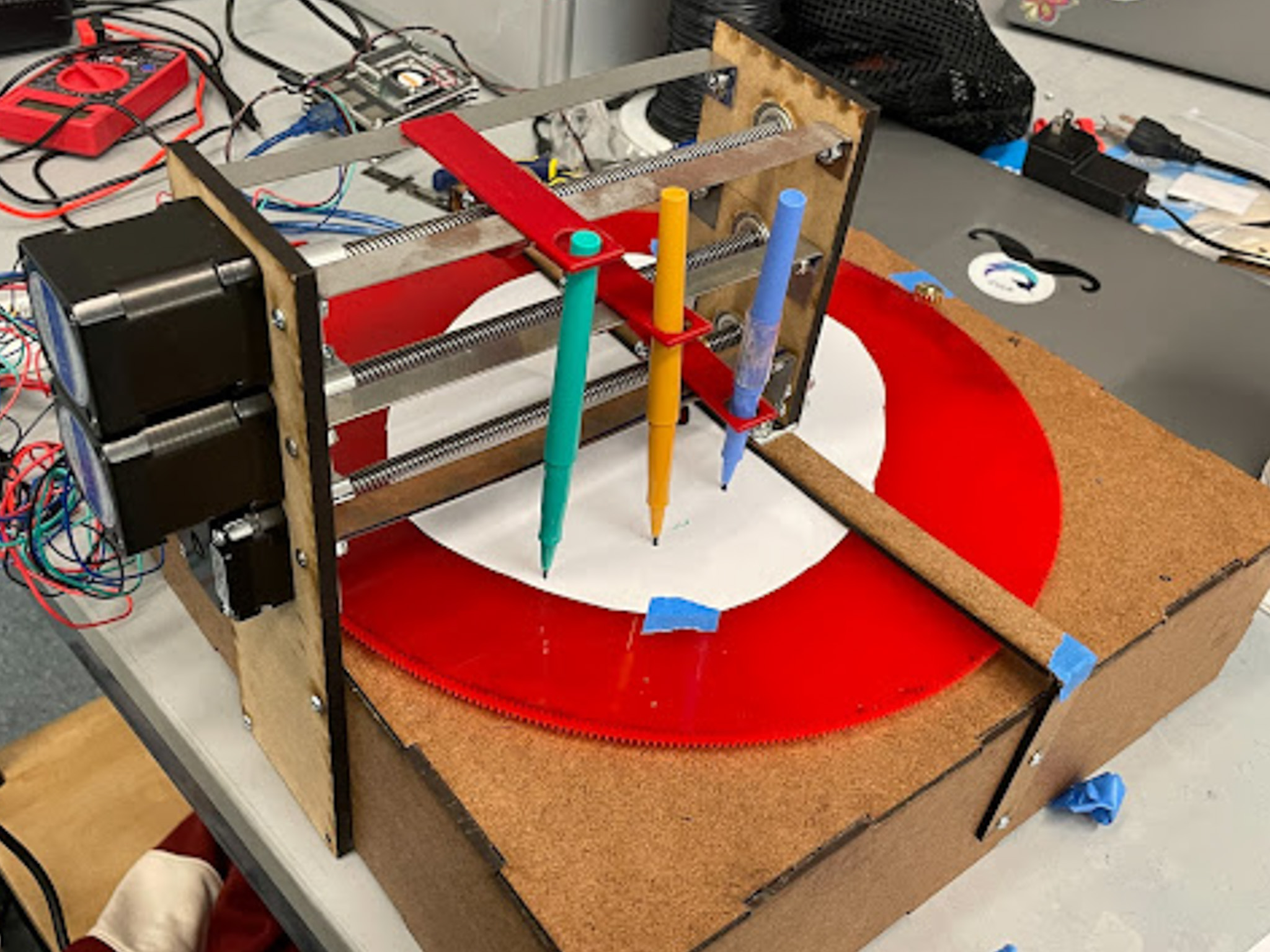
Developing a mechanism to move the pens back and forth was our main mechanical objective for this sprint. After investigating many linear motion mechanisms, we decided to use a lead screw because it would be easy to control, precise, sturdy, and relatively inexpensive.


Fig. CAD for sprint 2 prototype


When designing the linear motion mechanism, we hoped to use as few components as we could and make our system as compact as possible. We connected each of our three Nema 17 Stepper Motors directly to the lead screw using a shaft coupler and stacked the three identical mechanisms vertically. This also allowed us to keep the three pens aligned along the radius of the circle.

Fig. sprint 2 prototype


To mount the plate holding the ends of the lead screws, we chose to add a bar across the top of the disk. This created a secure attachment, while still allowing space to slide pieces of paper in and out of our machine. Finally, we replace our small motor gear with a COTS part, and recut our disk out of ¼” red acrylic with smaller teeth to mesh with it, helping our disk to spin more smoothly.


Electrical/Firmware Design:

The second sprint is when electronics were really kicked into action. Parts were ordered at the beginning of the sprint and assembled with some basic firmware by the end.

It took some time to figure out how to set up the stepper motor drivers correctly because I couldn't find any 10 μF capacitors in the Olin stock room and had to order more. It was also quite tricky to set the current limit correctly with a screw driver since I didn't initially have an alligator clip. These are definitely things I'd suggest confirming you have before staring if you try to recreate something similar.

Once the motor drivers were wired cleanly I attached one of the motors and tested it with an example script from the default Arduino stepper library. This worked great until I tried running both the DC and stepper motors at the same time. The stepper motor would jump around uncontrollably in both directions. Initially I thought our power source didn't have enough current for both motors but after testing and experimenting for a few hours I attempted controlling each with completely separate circuits and power supplies only to experience the same issue. At this point I realized that the issue was actually the DC motor's electromagnetic field and that my stepper signal wires needed to be twisted. Twisting all of the wires and adding small capacitors across the circuit eventually fixed this issue.

Once this was settled, I wrote an Arduino sketch to control the DC and stepper motor over serial and a short python script on the Raspberry Pi to send commands with dummy data. While these short steps always take longer than expected to tune perfectly, by the end of the sprint I had made good progress towards the final MVP, especially in terms of electronics.

Software Design:

The goal with this sprint was to get to an MVP level visual, where the frequencies were split up and represented with their changes over time.

One of the first steps was getting the frequency data over the course of the song. To do this, we ended up using a Fast Fourier transform to separate the frequencies, rather than using an audio processing library, because that ended up being more complicated.

Fig. "all_freq_data" Dataframe

We ended up with a dataframe with frequencies in the rows and time samples (in ms) in each column. The value in each cell corresponds to the volume of that signal. A few key observations are that the values go from 0 to -100, where 0 is the loudest and -100 is no audio signal.

The next step was to split it into three buckets, bass, mid, and treble. However, we found that the borderline between those categories was different with each song, based on how many frequencies comprised it. We ended up using a logarithmic scale to split the buckets. We then used a weighted average (that took a bit of tuning) to come up with the volume over time of each bucket. Visualized in a graph, it looks like this:

Fig. frequency plot over time

Unfortunately, all three buckets looked pretty similar. We also tried a percussion/harmonic split, which was a bit better. This is the same song but with the percussion removed:

Fig. frequency plot over time without percussion

However, that’s not really what we wanted either. We decided to leave the percussion in and see what it looked like in the circular representation we wanted.

Fig. first iteration of circular visual

They’re pretty basic and not that interesting to look at, but they captured the information we wanted to include, so they were a good start.

We then worked on creating a CSV to hold the positions we wanted each motor to be at at a given time, so that we could package the data from the visualizations into something that firmware could use. The CSV ended up looking something like this:

Fig. position CSV to pass to firmware

We were able to pass that to firmware for testing.

Sprint 3

Sprint 3 Goals:

Hit our MVP - creating a record player-like machine, where one rotation of the machine corresponds to the length of the song. While the machine rotates, 3 pens will shift back and forth to draw the intensity of various frequency bands. The resulting image is 3 concentric “circles”, with oscillations varying in intensity.

Mechanical:

Electrical/Firmware:

Software:

Mechanical Design:

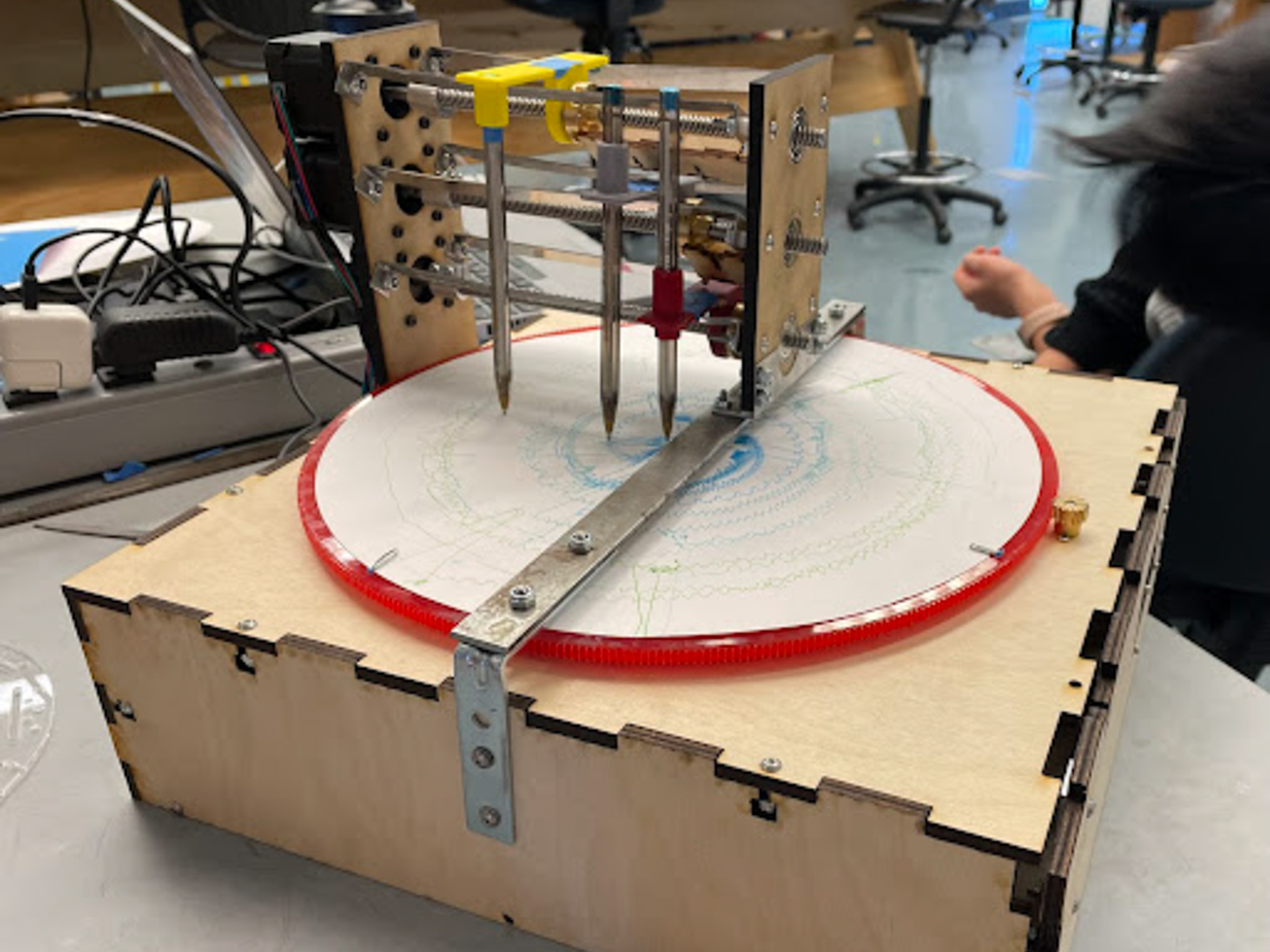
The mechanical design changes in sprint 3 included remaking the pen mounts to make them more sturdy, remaking the box out of ¼” plywood, and to develop a method to attach paper to the disk without tape.

Fig. sprint 3 prototype-full system

Electrical/Firmware Design:

I had the DC motor and one stepper motor working great from the last sprint. Initially I assumed that the code for the rest of the stepper motors would be nearly identical to what I had put together for sprint 2 but what I didn't realize at the time was that the default Arduino stepper library runs steppers with blocking functions, meaning that the entire program would essentially stop until a stepper motor reached its destination. This was clearly not going to work as we needed to run three steppers at the same time, separately, while also processing serial commands.

After research and experimenting with various solutions, I discovered the AccelStepper library, which, although more complicated and less documented than the default library, uses non-blocking functions to control stepper motors. This is explained in more detail on the Firmware Design page.

Once I figured out how to use the library, I rewrote the entire Arduino sketch and then did a significant amount of testing to determine parameters such as the stepper motor maximum speed. Once everything was working as expected and mounted on the final structure, I worked with software to determine the relationship between stepper steps and the linear movement of the lead screw and the speed of the disk relative to the speed setting on the DC motor.

Software Design:

One big goal was to continue making the visualizations better. We decided to add in oscillations to capture the feel of music a bit more and ended up with something like this:

Fig. first visualization with oscillations

This is much more dynamic, and we liked it a lot better. One important learning was that the sampling rate matters a lot, because it affects the density of the points. For example, the same song at different sampling rates:

Fig. the same song plotted at different sampling rates

Clearly, the one on the right is much more realistic for our physical system to draw.

We then tried putting in some different songs with different sounds, and got the following results (along with the previous two).

Fig. some more songs plotted with oscillations

Unfortunately, all the songs ended up looking pretty similar. We tried a couple things, like scaling things up to take more of the circle, but it didn’t change the visualizations too much. We also noticed that all four songs had a weird spike at the beginning/end, which we thought should not be the case.

Final Push

Mechanical Design:

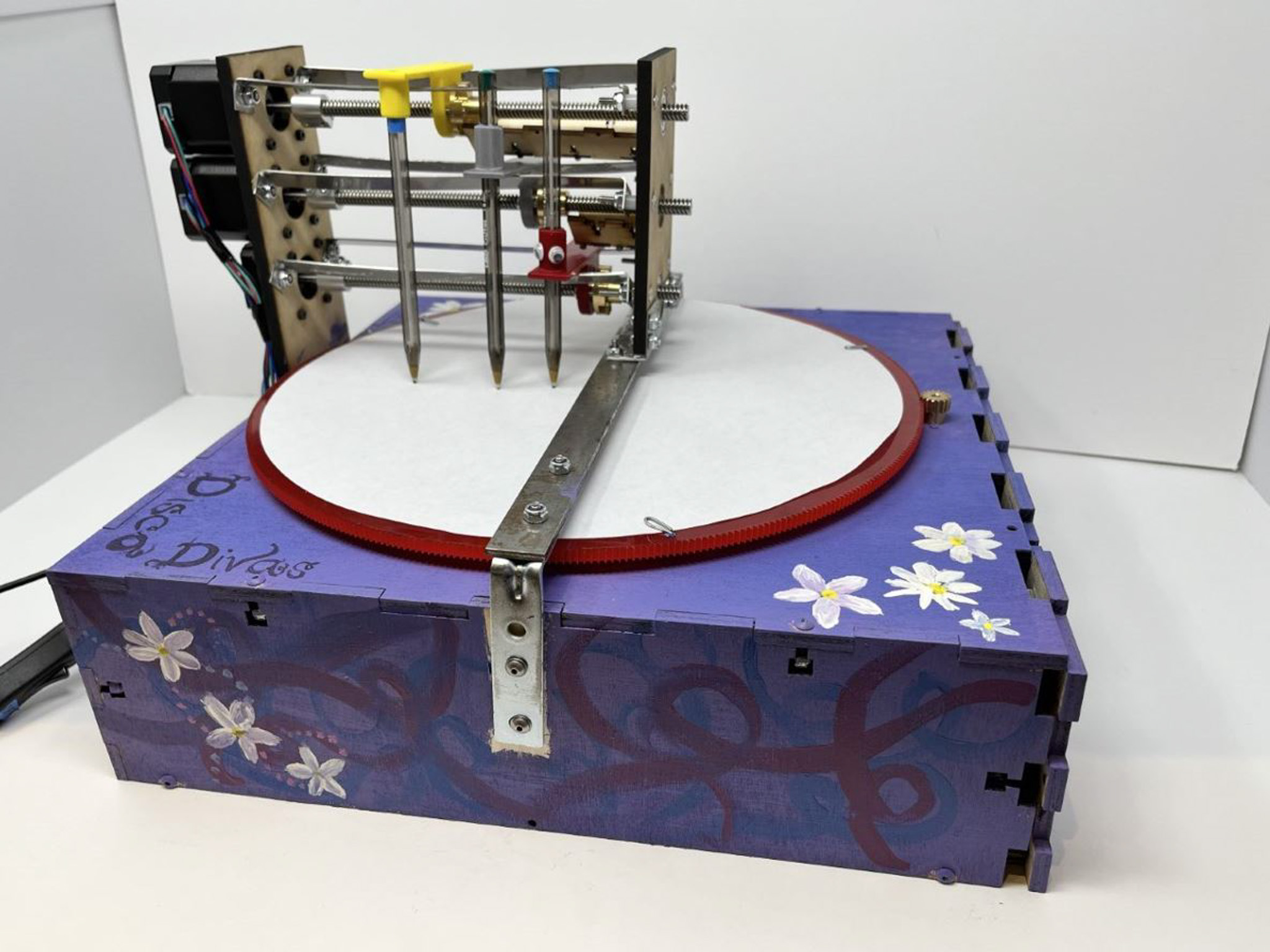
During the final push, we continued to fix small mechanical issues, like the pens' tension against the paper. We also added paint to the box!

Electrical/Firmware Design:

Everything left:

Immediately after the sprint 3 review, I got to work mounting all the electronics securely to the shelf that the mechanical team had put together. Although time consuming, this was very valuable as it eliminated the risk of loose wires.

An issue that had been discovered by the software team in the previous sprint was that sometimes stepper motors would lock up and loudly buzz when sent a new command before the motor had reached its target destination. To fix this I added the next_taget array described on the Firmware Design page to add a buffer of one command. This worked smoothly most of the time with only rare occurrences of the motor stalling when traveling thousands of steps. This logic was continuously tweaked for a few days, sometimes interrupting and overriding motor movement and sometimes waiting until the previous target was reached before starting again. We ultimately decided on the latter. If I had more time to work on this project I would have further optimized this code and tried adding different buffers for situations where several commands are being sent in the time it takes for the motor to move to a target position, as we observed happening on the final product, resulting in occasional skipped instructions. If that didn't resolve the issue I'd probably implement logic to check that the next instruction has the inverse instruction of the previous instruction to avoid cases where the rising edge of two waves are stacked and shift a band up*. Overall, considering the limits of stepper motor/lead screw speed, we should have either switched to belts to draw back the song in real time or slowed down the rotation of the disk (and process as a whole) to allow for the steppers get get where they need to be before sending more commands.

*at the end of the project we weren't sure if this was a firmware, software, or mechanical issue, but continued optimizations in each could have improved the outcome.

Software Design:

After the 3rd sprint, we had a little more time to improve the visualization. We got rid of the spike at the beginning by trimming the quiet parts of the song at the beginning and the end. We also pulled the -100 values up to -80 or so. Those two things were throwing off the scaling, because they were throwing off the average volumes. They made the visualizations a lot better. We also tried a classical song (because while all the songs we tried had different sounds, they’re all a little more similar to each other than they are to the classical song).

Fig. some of our final visualizations